Unlock real-time communication on Roblox by learning how to set up Spatial Voice, the platform's innovative voice chat feature. This comprehensive guide details every step from age verification and privacy settings to troubleshooting common issues. Discover who is eligible for Roblox voice chat and why age verification is a mandatory process for all users aged 13 and above. Understand the benefits of spatial audio for immersive gameplay and how to manage your privacy effectively. Navigate the necessary configurations to enable VC, resolve potential microphone problems, and explore supported games. This informational resource ensures you can seamlessly integrate voice chat into your Roblox adventures, enhancing social interaction and cooperative play within the vibrant metaverse. Prepare to elevate your gaming experience with direct, spoken communication today, making every interaction more dynamic and engaging for players worldwide.
Welcome, fellow Roblox explorer! Ever felt like your adventures were missing that crucial element of real-time chatter? You're not alone! Voice chat on Roblox, known as Spatial Voice, has revolutionized how we connect and play. This ultimate living FAQ is your go-to resource, updated for the latest patch, addressing everything from the basics of setting it up to advanced tips and troubleshooting. We've gathered all the burning questions, common issues, and insider tricks to ensure your voice chat experience is as smooth and enjoyable as possible. Whether you're a beginner just starting out or a seasoned player looking to optimize your setup, this guide has got you covered. Let's dive in and unlock the full potential of spoken communication on Roblox!
How do I enable voice chat on Roblox?
You can enable voice chat by verifying your age to be 13 or older using a valid ID. Once verified, go to your Roblox privacy settings, locate the 'Spatial Voice' toggle, and switch it on. Ensure your device's microphone is enabled for Roblox. This simple step unlocks real-time spoken communication, transforming your gaming.
What are the age requirements for Roblox VC?
Roblox requires users to be 13 years or older to access voice chat. This age gate is strictly enforced through an official ID verification process. Players under 13 cannot use voice chat, maintaining a safer environment for younger participants. Age verification is a one-time step.
Is Roblox voice chat free to use?
Yes, Roblox voice chat, known as Spatial Voice, is completely free for eligible users. Once you've successfully verified your age (13+), you can enable and use the feature without any additional cost. Just ensure you have a working microphone and the feature toggled on in your privacy settings.
How does Roblox Spatial Voice work?
Roblox Spatial Voice works by making in-game voices sound as if they're coming from the direction of other players. If someone is behind you, their voice sounds fainter or from the rear. This immersive audio system uses your microphone to transmit your voice and enhances real-time interaction within supported experiences.
Can I turn off Roblox voice chat at any time?
Absolutely! You have full control over your voice chat experience. You can easily turn off Spatial Voice in your Roblox privacy settings at any time. This allows you to opt out if you prefer text communication or wish to have a quieter gaming session.
So, you're curious about voice chat on Roblox, right? It's actually a pretty cool feature called Spatial Voice, and it lets you talk to other players in real-time, making games feel way more alive! Think about it like this: instead of typing, you can just chat as you explore or strategize. It really adds a whole new layer of immersion that text chat just can't quite capture. It's a game-changer for connecting with friends or even making new ones in supported experiences.
Getting started isn't super complicated, but there's one main hurdle: age verification. Roblox needs to make sure you're at least 13 years old, and they do this by asking you to verify your age with a valid ID. It might seem like a bit of a fuss, but it's really there to keep everyone safe and ensure the community standards are upheld. Once that's done, it's pretty much a simple toggle in your privacy settings, and you're good to go.
The best part about Spatial Voice is how it simulates real-world sound – if someone's far away, their voice sounds distant, and if they're close, it's clear. It makes in-game interactions incredibly natural. Just remember to be mindful of your surroundings and always be respectful. It's all about having fun and enhancing your Roblox adventures!
Most Asked Questions about How to Set Up VC on Roblox
Beginner Questions
How do I know if I'm eligible for Roblox voice chat?
Eligibility primarily hinges on your age. Roblox requires all users to be 13 years or older to access voice chat. You'll need to complete an age verification process using a valid photo ID, which helps Roblox maintain a safe and age-appropriate environment. Your account settings will guide you through this process.
What is the first step to setting up Spatial Voice?
The very first step is always age verification. Without it, the Spatial Voice option won't even appear in your settings. Head to your Roblox account settings, look for the 'Verify My Age' option, and follow the prompts. It's a quick process that usually takes minutes.
Where do I find the Spatial Voice toggle in my settings?
Once your age is verified, navigate to your Roblox account's 'Privacy' settings. Scroll down, and you should see a section for 'Spatial Voice' with a toggle switch. Simply click it to turn voice chat on or off. Remember to save any changes you make!
Can I use Roblox voice chat on mobile devices?
Yes, absolutely! Roblox Spatial Voice is designed to work across various platforms, including mobile devices (iOS and Android), PC, and Mac. As long as your device has a working microphone and the Roblox app is up to date, you can enjoy voice chat on the go.
Privacy & Safety Concerns
What privacy settings should I check for voice chat?
Within your Roblox privacy settings, you can control who can communicate with you via voice chat. Options typically include 'No one,' 'Friends,' or 'Friends of Friends.' Always review these settings to ensure they align with your comfort level and help maintain a secure and enjoyable experience.
How does Roblox moderate voice chat for safety?
Roblox employs a combination of automated systems and human moderators to monitor voice chat interactions for violations of community standards. They use advanced audio analysis to detect inappropriate content, ensuring a safer environment for all users. Prompt reporting of misuse helps keep the platform secure.
Can younger users accidentally access voice chat?
No, younger users cannot accidentally access voice chat due to the strict age verification requirement. The Spatial Voice feature is completely locked until a user successfully proves they are 13 years or older using a valid government ID. This robust system prevents underage access effectively.
Enabling & Configuration
What if the Spatial Voice toggle isn't showing up after age verification?
If the toggle is missing, first double-check that your age verification was successful and fully processed. Sometimes it takes a little time to update. If it persists, try clearing your Roblox cache or reinstalling the application. If all else fails, reaching out to Roblox Support is the next best step.
Do I need any special hardware for Roblox voice chat?
No special hardware is required beyond a working microphone, which is commonly found in most computers, laptops, and mobile devices. However, a good quality headset with a built-in microphone will significantly improve your audio clarity and reduce background noise, enhancing the overall voice chat experience.
How do I adjust my microphone sensitivity for Roblox VC?
Microphone sensitivity is usually managed through your device's operating system sound settings, not directly within Roblox. Access your sound input settings, find your microphone, and adjust its volume or sensitivity. You might need to do some testing to find the sweet spot where your voice is clear without being too loud or picking up too much background noise.
Tips & Tricks for Usage
What are some tips for clear voice communication?
For the best experience, use a quality headset with a built-in microphone. This minimizes background noise and ensures your voice comes through clearly. Also, find a quiet environment to play in. Adjust your microphone input sensitivity in your device's sound settings if you're too quiet or too loud.
How can I manage other players' voice volume?
Within a game supporting Spatial Voice, you'll often see an icon above other players' heads when they speak. You can usually click on this icon to mute individual players or adjust their specific volume levels. This is super handy for customizing your audio experience and filtering out any distracting chatter.
Are there any tricks to finding voice-enabled games quickly?
Yes! When browsing games on Roblox, look for the 'Spatial Voice Enabled' tag or filter. Many developers also promote their games' voice chat features in the game description or title. Community forums and fan groups are also great places to discover new voice-chat-friendly experiences.
Troubleshooting Common Issues
My microphone isn't working with Roblox VC, what should I do?
First, check your device's privacy settings to ensure Roblox has permission to access your microphone. Then, verify your microphone is selected as the default input device in your operating system's sound settings. Restarting the Roblox application or even your computer can often resolve minor glitches.
Why is my voice chat cutting out frequently?
Frequent cut-outs often point to a stable internet connection issue. Try moving closer to your Wi-Fi router or switching to a wired connection if possible. Outdated audio drivers can also cause this, so ensure your sound drivers are up to date through your device's settings manager.
I enabled VC but still can't hear anyone, what's wrong?
Check your in-game audio settings and your device's main volume. Ensure Spatial Voice is toggled on in your Roblox privacy settings. Sometimes, simply leaving and rejoining the game can fix audio synchronization issues. Also, confirm the game itself supports Spatial Voice.
Multiplayer & Social Interactions
Why can't I hear my friends specifically in voice chat?
Ensure both you and your friends have Spatial Voice enabled and have completed age verification. Also, check your in-game settings; some experiences allow individual muting. A quick fix can be for everyone to leave and rejoin the game, or verify their privacy settings allow voice chat with friends.
Does voice chat affect game performance or ping?
While voice chat does use a small amount of internet bandwidth, it generally has a minimal impact on game performance or ping for most users with a stable connection. If you notice significant lag, ensure your internet connection is robust and close any other bandwidth-heavy applications.
Can I use voice chat in private servers with my friends?
Yes, if the game itself supports Spatial Voice, you can absolutely use voice chat in private servers with your friends. This is a fantastic way to coordinate strategies, role-play, or just hang out without the noise of public servers. Just ensure everyone in your private server has VC enabled and verified their age.
Future & Advanced Features
What future enhancements can we expect for Roblox's communication features?
Roblox is constantly innovating, and we can expect exciting future enhancements for their communication features. Given their focus on immersion and social interaction, it's highly probable we'll see improvements in spatial audio fidelity, potentially more advanced moderation tools, and even deeper integration into avatar expressions or animations.
How does Roblox's Spatial Voice technology compare to other platforms?
Roblox's Spatial Voice technology stands out because of its seamless integration directly within diverse user-created experiences, which is a unique challenge for a platform like Roblox. It emphasizes natural interaction within a vast metaverse, setting it apart from more utilitarian voice solutions, with robust moderation for user-generated content.
Still have questions? Dive deeper with our guides on Roblox Account Security or How to Optimize Roblox Performance for a smoother experience!Hey everyone, ever wondered how to level up your Roblox experience by actually talking to your friends in-game? Many players are asking, 'How do I get voice chat on Roblox?' or 'What are the steps to enable VC in 2024?' You're in the right place to find out. Roblox voice chat, officially known as Spatial Voice, completely transforms how you interact within your favorite experiences. It adds an incredible layer of immersion and direct communication, making games feel far more dynamic. Imagine coordinating strategies in a fast-paced battle or just casually chatting while exploring a virtual world. This guide will walk you through every single step, ensuring you're ready to dive into the world of spoken interaction on Roblox.
Understanding **Roblox age verification** is crucial because it's the gatekeeper for Spatial Voice. Roblox mandates users be 13 or older for voice chat, requiring official ID verification to ensure compliance. This process safeguards younger players and maintains a safer communication environment within the platform. It's truly a key step for anyone wondering how to get voice chat access. Once verified, you'll experience **spatial audio Roblox**, which is incredibly cool. Spatial audio makes voice chat more immersive by making sounds seem like they come from the direction of other players in the game. This feature greatly improves gameplay, making interactions feel more natural and engaging, enhancing the 'where' of in-game communication. You'll also want to review your **Roblox privacy settings**. These settings impact VC usage significantly. Roblox offers robust privacy settings allowing users to control who they communicate with, including voice chat. You can limit voice chat to friends, friends of friends, or turn it off entirely. Understanding these settings is vital for 'who' can talk to you and 'how' to manage your experience securely.
Beyond just voice, knowing about other **Roblox communication features** is useful. What are the broader Roblox communication features available alongside VC? Besides voice chat, Roblox provides text chat, private messaging, and group chat functionalities. These features ensure diverse communication options, enabling players to interact in various ways depending on their preferences and the game's context, making it versatile 'how' people connect. Finally, be ready for **troubleshooting Roblox VC**. If voice chat isn't working, troubleshooting involves checking microphone settings, internet connection, and Roblox app permissions. Common issues often arise from outdated drivers or incorrect privacy settings, making it important to know 'when' to check and 'how' to fix them for smooth operation. We've got you covered on all these fronts.
Beginner / Core Concepts
- Q: What exactly is Roblox voice chat and how does it work? A: Roblox voice chat, officially called Spatial Voice, is a feature that lets you communicate with other players in real-time using your voice. It works by integrating your microphone input directly into supported Roblox experiences. The coolest part is its spatial audio component; this means voices sound like they're coming from the actual location of other avatars in the game world. If someone is standing to your right, their voice will sound like it's coming from the right, creating a much more immersive and realistic interaction. It's like having real conversations within your virtual world. You can adjust volumes and mute others, giving you control over your audio experience. This really changes the game, making collaborations and casual chats far more engaging. You've got this!
- Q: Who is eligible to use voice chat on Roblox right now? A: To use voice chat on Roblox, you need to be at least 13 years old. This isn't just a recommendation; it's a strict requirement enforced by an age verification process. Roblox does this to ensure a safer and more age-appropriate environment for all users, aligning with online safety standards. So, if you're 13 or older, you're on the right track! Verification involves submitting a valid government-issued photo ID. Once you've successfully completed this one-time step, the Spatial Voice option will become available in your account's privacy settings. It's all about making sure everyone has a positive and secure experience. Give it a shot, it's pretty straightforward!
- Q: Why do I need to verify my age to use Roblox VC? A: I get why this might seem like an extra step, but age verification is absolutely crucial for Roblox VC because it’s a strict safety measure. Roblox uses this process to confirm that players accessing voice chat are indeed 13 years or older, as per their community guidelines and legal requirements for online communication features. This ensures a safer environment, especially for younger players, by separating them from voice interactions they might not be ready for. It helps prevent inappropriate content and keeps the platform a positive place for everyone. Think of it as a digital bouncer, making sure everyone inside meets the criteria. Without a verified age, the Spatial Voice feature simply won't appear as an option in your settings. It’s for everyone’s good, honestly.
- Q: Is Roblox voice chat safe for me to use with strangers? A: This one used to trip me up too, but Roblox has put a lot of measures in place to make voice chat as safe as possible, even with strangers. First, remember that everyone using VC has gone through age verification, so they're at least 13. You also have powerful **Roblox privacy settings** at your fingertips. You can customize who can communicate with you via voice – options range from 'Friends' to 'Friends of Friends' or 'Everyone'. Plus, you can instantly mute, block, or report any player who makes you uncomfortable. Always trust your gut! If someone's making you feel uneasy, don't hesitate to use those moderation tools. Stay aware of your surroundings and communicate responsibly. You've got the tools to manage your experience safely.
Intermediate / Practical & Production
- Q: How do I enable Spatial Voice once my age is verified? A: Once your age is successfully verified, enabling Spatial Voice is a piece of cake! First, log into your Roblox account and navigate to your **Account Settings**. You'll usually find this by clicking the gear icon in the top right corner. From there, select the 'Privacy' tab on the left-hand side. Scroll down, and you should see a section clearly labeled 'Spatial Voice' with a toggle switch. Simply click that toggle to turn the feature 'On'. Make sure you save your changes before exiting the settings page. If you don't see the toggle, double-check your age verification status. It's usually instant, but sometimes it needs a moment to update across the platform. You'll be chatting in no time!
- Q: What kind of microphone setup is best for Roblox voice chat? A: While any functional microphone will technically work, a decent headset with a built-in microphone is truly best for Roblox voice chat. Why? Headsets provide clearer audio input by being closer to your mouth, reducing background noise and echoes significantly. This means other players hear you crisply, not your dog barking or your sibling playing in the next room. USB headsets are often plug-and-play friendly, making setup a breeze. If you're on a laptop, the built-in microphone can work, but consider a dedicated headset for optimal clarity and comfort during longer play sessions. Good audio makes a huge difference in communication quality. Try this tomorrow and see how clear you sound!
- Q: How can I control my voice chat volume and mute other players? A: Controlling your voice chat experience is surprisingly intuitive within Roblox games that support Spatial Voice. When another player is speaking, you'll often see a speaker icon or a volume bar floating above their avatar's head. You can typically click on this icon to bring up options to either mute that specific player or adjust their individual voice volume. This granular control is super handy for toning down a loud player or muting someone who's being disruptive without cutting off everyone else. For your own microphone, you usually manage its input volume through your device's operating system sound settings. Experiment with it; you'll find what works for you!
- Q: Where can I find games that support Roblox Spatial Voice? A: Finding games that leverage the full potential of **spatial audio Roblox** is easier than you think! When you're browsing the Roblox game library, keep an eye out for specific tags or filters. Many developers proudly display a 'Spatial Voice Enabled' tag in their game's description or on the game's thumbnail itself. You can also actively search for games by filtering for 'Voice Chat' or 'Spatial Voice' in the game discovery section. Popular social hangouts, role-playing games, and cooperative experiences are often among the first to adopt this feature. Don't be shy; dive in and discover new ways to interact!
- Q: How do I troubleshoot common issues if my Roblox VC isn't working? A: Oh, the dreaded VC not working moment! It happens to the best of us. For **troubleshooting Roblox VC**, first, ensure your device's operating system has granted Roblox permission to access your microphone. Check your sound settings to confirm the correct microphone is selected as the default input device. Sometimes, a simple restart of the Roblox application or even your computer can work wonders. Verify your internet connection is stable, as patchy Wi-Fi can cause cut-outs. Finally, double-check your Roblox privacy settings to ensure Spatial Voice is still toggled 'On'. Most issues are minor and easily fixable with these steps. You've got this!
- Q: What are the etiquette rules for using voice chat responsibly on Roblox? A: Using voice chat responsibly is key to a good experience for everyone! First and foremost, always follow Roblox's Community Standards – no harassment, hate speech, or inappropriate content. Be mindful of your background noise; mute yourself if you're not speaking to avoid distractions. Try to keep conversations relevant to the game you're playing, especially in focused experiences. Respect others' boundaries; if someone asks you to stop, stop. It's about being a good digital citizen and contributing to a positive, fun environment. A little respect goes a long way in making connections and enjoying your time on Roblox. Be a good neighbor, digitally speaking!
Advanced / Research & Frontier
- Q: How does Roblox's Spatial Voice technology compare to other platforms? A: Roblox's Spatial Voice technology stands out because of its seamless integration directly within diverse user-created experiences, which is a unique challenge for a platform like Roblox. While other platforms like Discord or in-game voice chats in AAA titles also offer voice communication, Roblox's system specifically focuses on the 'spatial' aspect, making voices literally come from the direction of avatars. This level of immersion, combined with robust moderation tools for a user-generated content platform, is quite impressive. It emphasizes natural interaction within a vast metaverse, setting it apart from more utilitarian voice solutions. It's a testament to Roblox's commitment to evolving communication.
- Q: Are there any known bugs or glitches with Roblox voice chat currently? A: Like any evolving technology, Roblox voice chat can sometimes experience minor bugs or glitches. Players occasionally report issues such as microphone input not registering, voices cutting out intermittently, or the Spatial Voice toggle disappearing after updates. Most of these are often resolved by restarting the application, checking device permissions, or ensuring stable internet. Roblox’s development team actively monitors and addresses these issues, rolling out fixes with updates. Staying updated on community forums can also give you insight into widespread issues and temporary workarounds. Don't worry, they're usually quick to fix these things.
- Q: How can I provide feedback or report issues about Spatial Voice to Roblox? A: Roblox genuinely values user feedback, and they've made it easy to report issues or share your thoughts on Spatial Voice. The best way is typically through their official support page. Look for the 'Contact Us' or 'Support' section on the Roblox website. When submitting a ticket, be as detailed as possible about the issue you're experiencing, including screenshots or video if possible. You can also participate in official Roblox developer forums if you're a creator. Your input helps them refine and improve the feature for everyone! Don't be afraid to speak up; it helps make the platform better.
- Q: What future enhancements can we expect for Roblox's communication features? A: Roblox is constantly innovating, and we can expect exciting future enhancements for their **Roblox communication features**. Given their focus on immersion and social interaction, it's highly probable we'll see improvements in spatial audio fidelity, potentially more advanced moderation tools, and even deeper integration into avatar expressions or animations. We might also see more sophisticated controls for privacy and user customization, allowing players even greater agency over their communication experience. As the metaverse evolves, so too will the ways we connect within it. Keep an eye on official Roblox announcements; they often share their roadmap for new features.
- Q: Can voice chat be used on all devices that support Roblox? A: Generally, yes, voice chat is designed to be accessible across most major platforms where Roblox is available, provided your device has a functional microphone. This includes PC, Mac, iOS, and Android devices. However, compatibility can sometimes vary slightly based on specific hardware configurations or operating system versions. It's always a good idea to ensure your Roblox application is fully updated to the latest version, as this ensures you have all the necessary features and bug fixes. The goal is broad accessibility, so most players should be able to jump into voice chat regardless of their device.
Quick Human-Friendly Cheat-Sheet for This Topic
- Verify your age with a valid ID (13+) to unlock voice chat; it's a must-do first step!
- Turn on Spatial Voice in your Roblox privacy settings once your age is confirmed.
- Use a decent headset or microphone for clear communication; it makes a huge difference.
- Remember to mute yourself when not speaking to avoid any distracting background noise.
- Explore games tagged with 'Spatial Voice' for the best and most engaging experiences.
- If it's not working, check your Roblox app permissions and your device's microphone settings.
- Always be respectful and follow Roblox's community standards when chatting; good vibes only!
Roblox voice chat (Spatial Voice) requires users to be 13 or older with ID verification. Learn to enable VC in privacy settings, troubleshoot common audio issues, and utilize spatial audio for immersive gameplay. Control your communication with in-game mute features and privacy options, ensuring a safe and enjoyable experience across supported games.
35
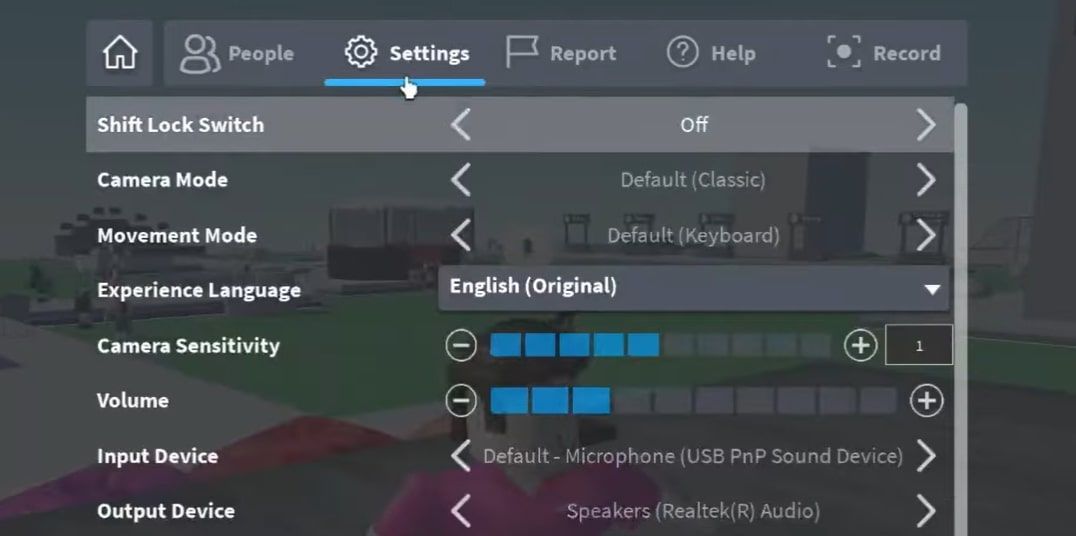


How To Use Vc In Roblox Platform Usage Support Developer Forum Roblox . How To Fix Roblox Voice Chat Not Working On Windows 11 Turn The Volume Up By Clicking The Plus Icon Next To It . How To Get VC In Roblox 2025 Updated Voice Chat Tutorial YouTube . How To Enable Vc On Roblox New Update TURN ON Roblox VC Guide . How To Turn ON VC Voice Chat In Roblox YouTube


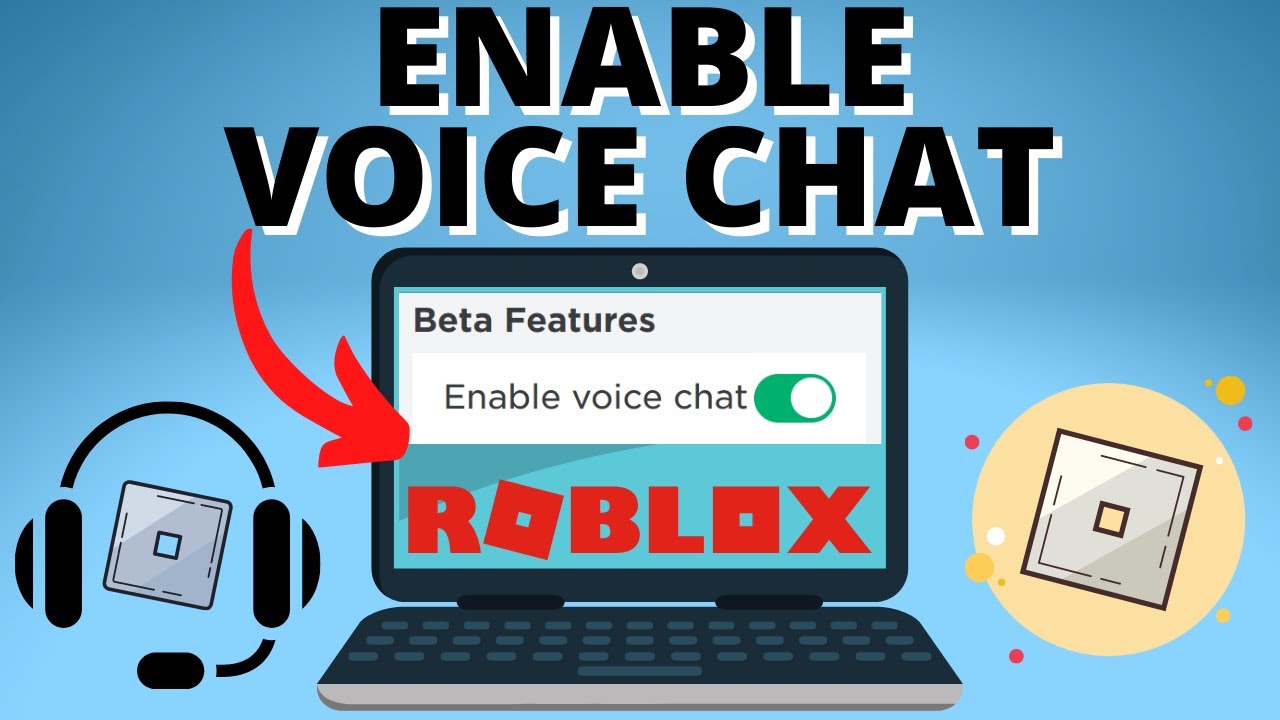

Find Voice Chat VC Servers On Roblox . Roblox How To Enable VC Feature On Roblox Voice Chat Tutorial YouTube . Voice Chat How To Get VC In Roblox Quick Tutorial Enable Roblox . How To Enable Voice Chat On Roblox Setup Tutorial YouTube . HOW TO TURN ON AND USE VOICE CHAT IN ROBLOX 2022 VC ENABLE YouTube


Find Voice Chat VC Servers On Roblox . Top 5 Ways To Get Roblox VC Latest Update YouTube . How To Actually Get Vc Or Voice Chat Feature On Roblox Unlock Roblox . How To Turn On VC Or Mic In Roblox Enable Roblox Mic 2025 Guide YouTube . How To Enable Vc In Roblox YouTube Maxres2


How To Set Up Voice Chat On Roblox Playbite How To Set Up Vc On Roblox . How To Enable Vc In Roblox YouTube Oar2 . How To Get VC On Roblox Mini Militians Hub How To Get VC On Roblox . How To ACTUALLY Turn On Vc Or Voice Chat On Roblox Enable Roblox VC . How To Use Vc In Roblox Without Id YouTube





What Will Roblox Look Like In 2026 Blog Graphics 26 . How To Join Vc In Roblox YouTube . How To Add People Roblox Easily Your 2026 Guide . How To Get Roblox Vc YouTube Maxres2 . How To Join Roblox VC A Step By Step Guide To Connecting With Friends How To Join Roblox Vc 500x313



How To Get VC In Roblox Roblox Voice Chat 2026 YouTube . How To Join Roblox VC A Step By Step Guide To Connecting With Friends Add Music Your Roblox Game 768x480 . Roblox VC Play On Roblox NoFilter. Discover How To Get VC On Roblox Simple Guide To Enable Voice Chat FPS Drop Roblox 2 1400x700 . How To Join Roblox VC A Step By Step Guide To Connecting With Friends How To Join Roblox Vc 100x63


Definitive Guide To Roblox 2026 Infinity TM 07169 Definitive Guide To Roblox 2026 3 . Roblox Voice Chat Back In Action . Roblox 2026 Logo REVEALED New Color New Look YouTube Maxres2 . How To Turn On Vc On Roblox Ipad Or Iphone Activate Roblox VC . Calendar Club Definite Guide To Roblox 2026 Annual 1200x1769