Worried about your electricity bill soaring because of your gaming habit? You are not alone! Many dedicated gamers wonder, "does gaming pc use a lot of electricity?" especially as component power demands seem to climb with every new generation. This comprehensive guide dives deep into the real power consumption of gaming PCs, breaking down what components are the biggest energy hogs and offering practical, actionable tips to measure, reduce, and optimize your setup. Discover smart strategies to lower your electricity costs without sacrificing performance, learn about efficient hardware choices, and understand how your gaming habits impact your home's energy footprint. We will explore everything from GPU and CPU power draw to the benefits of efficient power supplies and software settings, ensuring you can balance high-fidelity gaming with smart energy management. Get ready to game smarter, not harder, and keep those bills in check while enjoying your favorite titles. This article provides vital insights for any gamer looking to optimize their experience.
Does a gaming PC truly consume significantly more electricity than a regular PC?
Yes, a gaming PC consumes considerably more electricity than a standard office or home PC. This is primarily because gaming PCs feature powerful, dedicated graphics cards (GPUs) and high-performance CPUs that require substantial power to render complex graphics and maintain high frame rates during gameplay. While an idle gaming PC might draw similar power to a regular PC, under heavy gaming load, it can pull 3 to 6 times more wattage from the wall, leading to higher electricity bills.
What are the main components that drive up electricity usage in a gaming PC?
The Graphics Processing Unit (GPU) and the Central Processing Unit (CPU) are the two primary components responsible for the vast majority of electricity consumption in a gaming PC. High-end GPUs can draw over 450 watts on their own, while powerful CPUs can demand over 200 watts. Other components like RAM, SSDs, and fans contribute, but their power draw is minor in comparison to these core processors.
How can I accurately calculate my gaming PC's daily electricity cost?
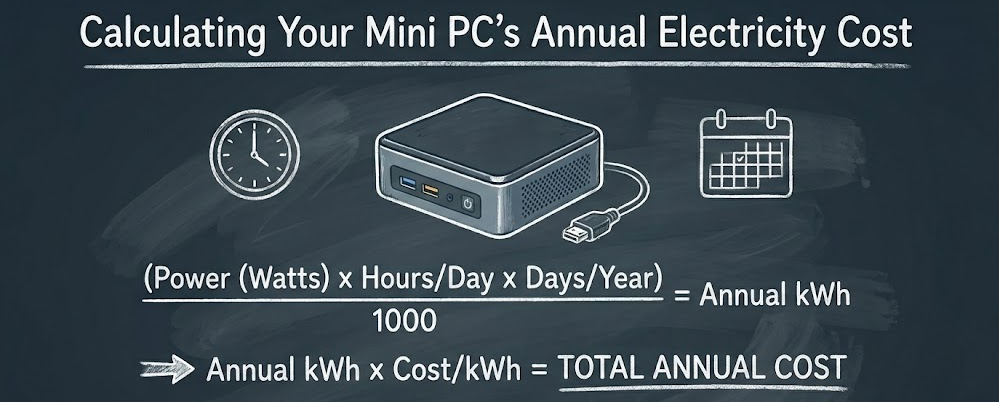
To accurately calculate your gaming PC's daily electricity cost, you'll need a Kill-A-Watt meter or a smart plug with energy monitoring. Plug your PC into the device to measure its real-time wattage. Track your average wattage during gaming and idle periods, then multiply by the hours of use for each state. Convert total watt-hours to kilowatt-hours (kWh) by dividing by 1000, and finally, multiply by your local electricity rate per kWh (found on your utility bill).
Are there practical settings or software optimizations to lower my gaming PC's power draw?
Absolutely! Several software optimizations can reduce your gaming PC's power draw. Key methods include adjusting in-game graphics settings (reducing anti-aliasing, shadows), capping your frame rate (FPS) to match your monitor's refresh rate, utilizing your operating system's balanced or power-saver power plans for non-gaming tasks, and even undervolting your GPU or CPU using specialized software like MSI Afterburner. These can significantly cut down on wasted energy.
When is upgrading to newer hardware beneficial for reducing electricity consumption?
Upgrading to newer hardware is particularly beneficial for reducing electricity consumption if your current PC components are several generations old (e.g., 5+ years). Modern GPUs and CPUs often offer significantly better performance per watt, meaning you can achieve the same or greater gaming performance with less power draw. Additionally, upgrading to an 80 PLUS Gold or Platinum rated Power Supply Unit (PSU) immediately improves overall system efficiency by reducing energy loss during power conversion.
Do gaming laptops offer a significant power saving over desktop gaming PCs?
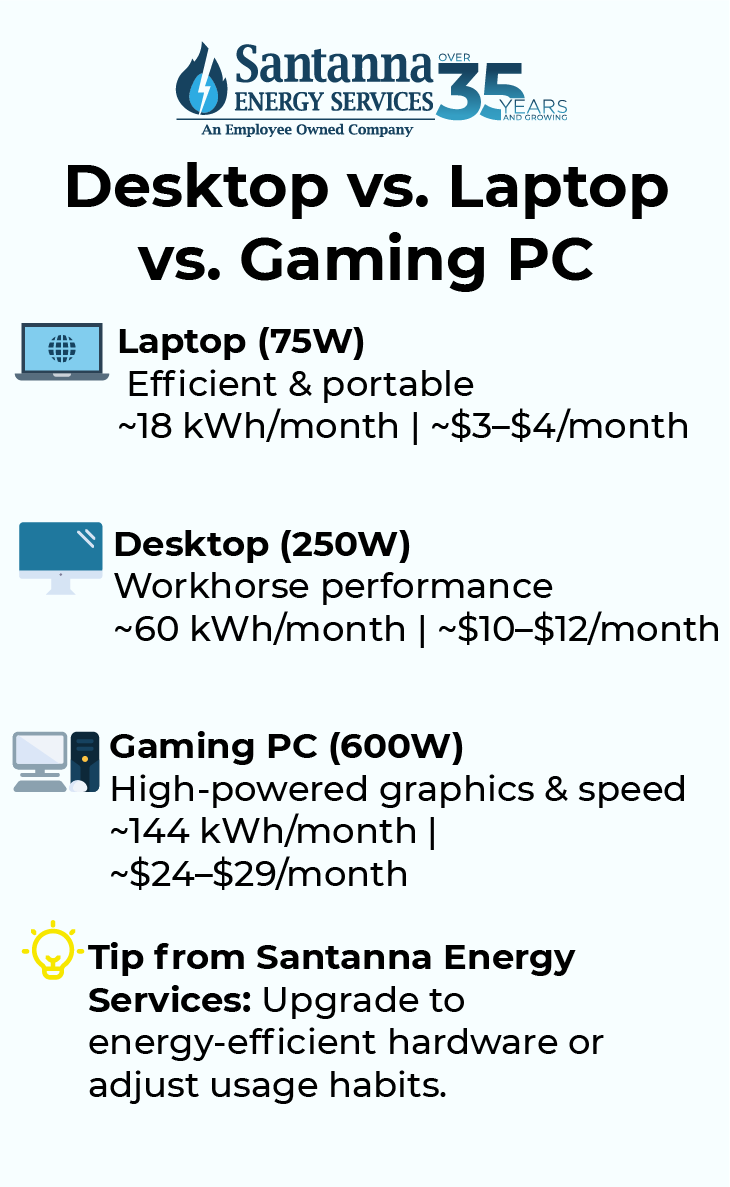
Yes, gaming laptops generally offer significant power savings compared to desktop gaming PCs. Laptop components are specifically optimized for efficiency due to thermal and battery constraints, featuring mobile-optimized GPUs and CPUs that draw less power. While they might offer slightly less raw performance for the price, a high-end gaming laptop typically consumes 150-250 watts under load, considerably less than a desktop's 300-600+ watts.
What are some common misconceptions about gaming PC power usage?
A common misconception is that a gaming PC constantly draws maximum power. In reality, modern PCs dynamically scale power consumption based on workload, drawing much less at idle. Another myth is that simply having a powerful PSU means higher bills; PSU wattage indicates capacity, not constant draw. Finally, many believe minor peripherals have a huge impact, but the GPU and CPU remain the dominant power consumers, overshadowing mouse, keyboard, or even small external drive usage.
Hey there, fellow gamers! Ever found yourself deep into an epic session, only to glance at the clock and then nervously eye your electricity meter? You are not alone. The burning question, "does gaming PC use a lot of electricity?" is a common concern for many of us who balance our passion for pixels with adulting responsibilities like jobs, families, and, well, bills. We love our high-fidelity worlds and competitive streaks, but nobody wants a power bill that feels like a boss fight. With the average US gamer dedicating 10+ hours a week to their favorite titles, and 87% playing regularly, understanding our gaming rig's energy footprint is more relevant than ever. This month, as new games drop and hardware pushes boundaries, let's cut through the hype and get real about PC power consumption. We will explore what really drives up your electricity usage, how to measure it, and most importantly, how to optimize your setup to save money and energy without compromising on those crucial frames per second. Think of this as your practical guide to gaming smarter and more sustainably.
You cherish those moments of relaxation, skill-building, and social play that gaming offers. Whether it is unwinding after a long day with a cozy indie title or strategizing with friends in a competitive esport, your PC is your portal. But performance optimization and value for money are key. We are here to help you navigate common pain points like unexpected bill hikes and budget hardware upgrades. Let's dive in and empower you to game on without the guilt or the shock of a high electricity statement.
Does Gaming PC Use A Lot Of Electricity?
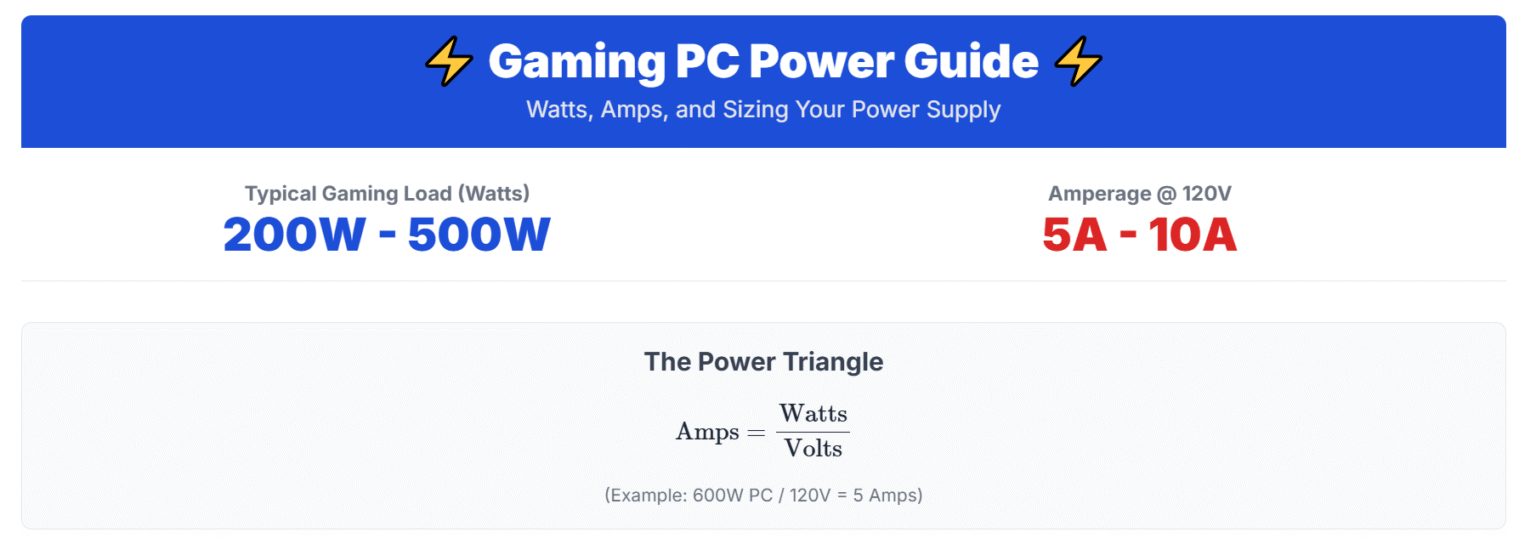
Yes, compared to a standard office PC or a console, a gaming PC generally uses significantly more electricity. This is primarily due to the powerful components required to render complex graphics and maintain high frame rates. While a typical desktop PC might draw 50-150 watts, a high-end gaming PC under load can easily pull 300-600 watts, and even more with top-tier GPUs and CPUs. The key word here is 'under load' – when you are actively gaming, your components are working their hardest. However, when idling or performing light tasks like browsing, the power draw drops considerably, often similar to a non-gaming desktop.
Understanding this fluctuation is crucial. Your PC isn't always running at peak consumption. Modern hardware has advanced power-saving features that scale down usage when not needed, but intense gaming sessions will always demand more power. This is the trade-off for stunning visuals and smooth gameplay that gamers love and expect from their rigs.
Which PC Components Consume The Most Power?
When it comes to electricity usage in a gaming PC, two components are the undisputed champions of power draw: the Graphics Processing Unit (GPU) and the Central Processing Unit (CPU). These are the workhorses responsible for the heavy lifting in games, and their power demands scale directly with their performance.
Graphics Processing Unit (GPU): The GPU is almost always the biggest power consumer. High-end GPUs from NVIDIA and AMD can individually draw anywhere from 200W to over 450W under full load. This is because they are constantly rendering complex 3D environments, textures, and effects at high resolutions and frame rates. The more powerful your GPU, the more electricity it will likely consume when pushed to its limits.
Central Processing Unit (CPU): While typically less power-hungry than the GPU, modern CPUs, especially those with many cores and high clock speeds, can still draw significant power. Gaming CPUs can range from 65W to 250W+ when under heavy load. The CPU manages game logic, AI, physics, and many background processes, making its efficiency vital for overall system performance.
Power Supply Unit (PSU): While the PSU doesn't consume power in the same way, its efficiency rating directly impacts how much power it draws from the wall to deliver to your components. An 80 PLUS Gold rated PSU, for example, is more efficient than a Bronze rated one, meaning less electricity is wasted as heat during conversion.
Other Components: RAM, SSDs/HDDs, motherboards, and cooling fans consume relatively little power in comparison. A fast NVMe SSD might draw 5-10W, while a few case fans might add another 10-20W combined. While these add up, they are minor compared to the GPU and CPU.
How Can I Measure My Gaming PC's Electricity Usage?
Accurately measuring your gaming PC's electricity usage is easier than you might think and can provide valuable insights into your true power consumption. This knowledge empowers you to make informed decisions about optimization.
Kill-A-Watt Meter: The simplest and most effective method is using a Kill-A-Watt meter (or a similar brand power meter). You plug this device into your wall outlet, and then plug your PC's power cable into the meter. It will display real-time wattage consumption, voltage, amperage, and even calculate cumulative kilowatt-hours (kWh) over time. This lets you see the idle consumption, peak consumption during gaming, and the total energy used over a day or week. They are affordable and readily available online or at hardware stores.
Software Monitoring: For real-time component-specific usage, software tools like HWMonitor, MSI Afterburner, or HWiNFO can show you the power draw of your CPU and GPU directly from their sensors. While these provide excellent data for individual components, they do not show the total system draw from the wall, as they do not account for PSU inefficiency or other components.
Smart Plugs: Many smart home plugs now come with energy monitoring features. You can plug your PC into one of these, and then use the accompanying app on your smartphone to track real-time and historical power consumption, often with daily, weekly, or monthly reports. This offers convenience and remote monitoring.
Using a physical meter or a smart plug provides the most accurate overall system power draw, including the power lost to PSU inefficiency and the consumption of minor components. This is what you need to calculate your actual electricity bill impact.
What Is The Average Cost Of Running A Gaming PC?
The average cost of running a gaming PC can vary significantly based on your hardware, how often you game, and your local electricity rates. Let's break down a typical scenario to give you an idea.
First, you need your electricity rate, usually measured in cents per kilowatt-hour (kWh). The average residential electricity rate in the US is around 16 cents per kWh, but this can range from less than 10 cents to over 30 cents depending on your state and provider. For this example, let's use 16 cents/kWh.
Next, estimate your PC's power draw. A mid-range gaming PC might average 300-400 watts (0.3-0.4 kW) during active gaming. If you game for 3 hours a day, that's:
Daily Usage: 0.4 kW * 3 hours = 1.2 kWh
Daily Cost: 1.2 kWh * $0.16/kWh = $0.192
Monthly Cost: $0.192 * 30 days = $5.76
Yearly Cost: $5.76 * 12 months = $69.12
However, this doesn't account for idle time or less intensive tasks. If your PC is on for 8 hours a day, with 3 hours gaming and 5 hours idling (at, say, 100 watts or 0.1 kW):
Idle Usage: 0.1 kW * 5 hours = 0.5 kWh
Total Daily Usage: 1.2 kWh (gaming) + 0.5 kWh (idle) = 1.7 kWh
Total Monthly Cost: (1.7 kWh * $0.16/kWh) * 30 days = $8.16
For high-end setups drawing 600W (0.6 kW) for longer sessions, or in regions with higher electricity rates, this cost can easily double or triple. While it's not typically a budget-breaker for most, understanding these figures helps you appreciate the impact and identify areas for savings. For context, charging your phone for a year costs pennies, while a gaming PC can be equivalent to running a medium-sized appliance for a good chunk of time.
Are There Eco-Friendly Ways To Game On PC?
Absolutely! Gaming and environmental consciousness are not mutually exclusive. As gamers, we can adopt several eco-friendly practices to reduce our carbon footprint and promote sustainable gaming habits. It's about smart choices that benefit both your wallet and the planet.
Optimize Power Settings: Utilize your operating system's power management options. Set your PC to go to sleep or hibernate after a period of inactivity. Modern systems wake up quickly, making this a negligible inconvenience for significant savings. Undervolting your CPU and GPU can reduce power draw and heat, leading to less energy consumption and potentially longer component lifespan.
Upgrade Smartly: When upgrading, prioritize components with higher power efficiency ratings (e.g., NVIDIA's Max-Q designs for laptops, or AMD's RDNA 3 architecture which often offers great performance per watt). Look for PSUs with 80 PLUS Gold or Platinum ratings for optimal efficiency. Sometimes, a newer, more efficient component can outperform an older, power-hungry one while drawing less power.
Power Down Peripherals: Turn off monitors, speakers, and external drives when not in use. Even in standby, these devices can draw 'vampire power'. Consider a smart power strip that cuts power to peripherals when your main PC is off.
Game Mindfully: Do you need to run every game at ultra settings with ray tracing if the performance hit is significant and the visual difference subtle? Dialing down a few graphics settings can drastically reduce GPU load and thus power consumption, often without impacting your enjoyment. Also, consider the types of games you play; less graphically intensive titles use less power.
Proper Cooling & Maintenance: A PC that runs cooler operates more efficiently. Regularly clean your fans and heatsinks to ensure optimal airflow, preventing components from overheating and drawing more power to compensate.
Consider Cloud Gaming: For some, cloud gaming services can be an eco-friendly alternative. Instead of a powerful local machine, you stream games from data centers, allowing you to use a low-power device at home. The energy is still consumed, but potentially more efficiently at scale in a optimized data center.
How Do Gaming Laptops Compare In Power Consumption?
Gaming laptops generally consume significantly less electricity than their desktop counterparts, primarily due to their design constraints and optimized components. This makes them a popular choice for gamers who need portability, space-saving solutions, or are particularly conscious about power usage.
A high-end gaming laptop might draw anywhere from 150W to 250W from the wall when under full gaming load. Compare this to a desktop, which, as we discussed, can easily hit 300W-600W+. The reasons for this difference include:
Mobile-Optimized Hardware: Laptop GPUs and CPUs are specifically designed to be more power-efficient than their desktop equivalents. They often have lower clock speeds, fewer cores, or slightly different architectures to fit within thermal and power budgets.
Thermal Constraints: Laptops have much smaller cooling systems. To prevent overheating, components are designed to operate within stricter thermal limits, which inherently means lower power draw.
Integrated Power Solutions: Laptops feature highly integrated power management systems that dynamically adjust component power based on demand, prioritizing battery life and thermal stability.
While gaming laptops offer lower power consumption, they often come with a trade-off in raw performance compared to similarly priced desktop PCs. However, for many gamers who prioritize convenience and lower electricity bills, the performance offered by modern gaming laptops is more than sufficient for enjoyable experiences, including popular titles and social gaming trends.
Tips To Reduce Your Gaming PC's Electricity Bill?
Want to keep gaming without fretting over your power bill? Here are some practical tips that can significantly reduce your gaming PC's electricity consumption and, by extension, your monthly costs:
Adjust In-Game Graphics Settings: This is one of the quickest and most impactful ways. Reducing settings like anti-aliasing, shadow quality, or texture resolution, especially for details you might not even notice during fast-paced action, lowers the load on your GPU. A lower GPU load means less power draw. Experiment to find your personal sweet spot between visual fidelity and energy efficiency.
Enable V-Sync or Cap FPS: If your GPU is rendering hundreds of frames per second when your monitor only displays 60 or 144, it's doing unnecessary work and consuming excess power. Enable V-Sync or manually cap your in-game FPS to match your monitor's refresh rate (or slightly above if you prefer a buffer). This prevents your GPU from overworking.
Utilize Your OS Power Plans: In Windows, go to Control Panel > Power Options. Set a balanced power plan, or even a power-saver plan for non-gaming tasks. You can often customize these plans to have your monitor turn off or your PC sleep after specific idle periods. For gaming, you might switch to a 'High Performance' plan, but remember to revert or let the system manage it post-session.
Undervolt Your GPU/CPU: This advanced technique involves reducing the voltage supplied to your GPU or CPU while maintaining (or even slightly increasing) clock speeds. Less voltage means less power consumption and less heat, leading to better efficiency. Tools like MSI Afterburner for GPUs or specific BIOS settings for CPUs can help, but proceed with caution and research, as improper undervolting can cause instability.
Upgrade to an Efficient PSU: If your Power Supply Unit (PSU) is old or has a low efficiency rating (e.g., 80 PLUS White or Bronze), consider upgrading to an 80 PLUS Gold, Platinum, or Titanium rated PSU. A more efficient PSU wastes less electricity as heat during power conversion, saving you money over time, especially with higher power draw components.
Turn Off Your PC (or Use Sleep/Hibernate): The simplest advice often forgotten. If you are stepping away from your PC for several hours or overnight, turn it off. If you prefer quick access, use 'Sleep' mode (which uses minimal power) or 'Hibernate' (which uses almost no power and saves your session). Leaving your PC running idle consumes continuous power.
By implementing even a few of these tips, you can enjoy your gaming without the added stress of a surprisingly high electricity bill, striking that perfect balance between immersive gameplay and smart energy use.
Does Power Supply Efficiency Matter For PC Electricity Use?
Yes, power supply unit (PSU) efficiency absolutely matters when it comes to your PC's overall electricity use and your electricity bill. The PSU is responsible for converting the AC power from your wall outlet into the DC power that your PC components can use. This conversion process isn't 100% efficient; some energy is always lost as heat.
PSU efficiency is rated by the 80 PLUS certification program (Bronze, Silver, Gold, Platinum, Titanium), indicating how much power is actually delivered to your components versus how much is drawn from the wall. For example:
An 80 PLUS Bronze PSU is at least 82% efficient at 20% load, 85% at 50% load, and 82% at 100% load.
An 80 PLUS Gold PSU is at least 87% efficient at 20% load, 90% at 50% load, and 87% at 100% load.
This means if your PC components need 500 watts, an 80 PLUS Bronze PSU might draw around 588 watts from the wall (500W / 0.85), while an 80 PLUS Gold PSU would draw about 555 watts (500W / 0.90). That 33-watt difference, when multiplied by hours of gaming, days, and your electricity rate, adds up. Over the lifespan of your PC, a more efficient PSU can lead to noticeable savings on your electricity bill. It also generates less heat, potentially contributing to a cooler and quieter system. When buying a PSU, aiming for an 80 PLUS Gold or higher rating is a wise investment for long-term efficiency and cost savings.
When Should I Upgrade For Better Power Efficiency?
Upgrading your PC for better power efficiency is a smart move, especially if you have an older system or are noticing higher-than-expected electricity bills. Here are some scenarios when it makes sense to consider an upgrade focused on efficiency:
Very Old Hardware: If your CPU or GPU is several generations old (e.g., 6+ years), newer components often offer significantly better performance per watt. A modern mid-range GPU might offer similar or better performance than a high-end card from five years ago while consuming substantially less power. This is a crucial factor for value-conscious gamers.
High Electricity Rates: If you live in an area with very high electricity costs, the savings from more efficient components can justify an upgrade sooner. The return on investment (ROI) on a more efficient PSU or GPU will be quicker.
Frequent, Long Gaming Sessions: The more you game, the more hours your PC is drawing significant power. If you are one of the 87% of US gamers playing regularly, particularly those clocking 10+ hours a week, even small efficiency gains add up to substantial savings over time.
Noisy or Hot System: Older, less efficient components tend to generate more heat, leading to louder fans trying to keep things cool. Upgrading to more efficient hardware often means a cooler-running system, which translates to quieter operation and a more pleasant gaming environment.
PSU Upgrade: As discussed, upgrading your Power Supply Unit to an 80 PLUS Gold or Platinum rating can immediately improve system efficiency, especially if you currently have a very basic or old PSU. This is often an overlooked upgrade but provides immediate returns.
Before upgrading, consider your current hardware's age and performance, your gaming habits, and local electricity costs. Often, a targeted upgrade of one or two key components (GPU, CPU, or PSU) can yield significant efficiency improvements without requiring a full system overhaul, helping you stay current without breaking the bank or your energy budget.
Can Software Settings Impact My PC's Power Draw?
Absolutely! Software settings play a surprisingly significant role in your PC's power draw, allowing you to fine-tune your energy consumption without touching a single piece of hardware. This is particularly useful for gamers who want to maintain performance when needed but reduce power during less intensive tasks.
In-Game Graphics Settings: As mentioned, reducing demanding settings like anti-aliasing, shadow quality, or rendering resolution can drastically lower your GPU's workload. Less workload means less power. If you are playing an older title or a casual game, you likely don't need maximum settings.
Frame Rate Limiters (FPS Caps): If your monitor has a 60Hz refresh rate, rendering 200 FPS in a game is overkill and wastes power. Using in-game FPS limiters or utilities like NVIDIA Control Panel/AMD Radeon Software to cap your frame rate to your monitor's refresh rate (or slightly above) prevents your GPU from working harder than necessary.
Operating System Power Plans: Windows' power plans (Balanced, Power Saver, High Performance) dynamically adjust CPU speed, screen brightness, and sleep timers. For non-gaming tasks, 'Balanced' or 'Power Saver' can significantly reduce idle power consumption. Remember to use 'High Performance' when gaming for optimal frame rates, then switch back.
GPU Control Panel Settings: Both NVIDIA and AMD drivers offer extensive control panels (NVIDIA Control Panel, AMD Radeon Software) where you can manage power settings, texture filtering quality, and other graphics options. Adjusting these can impact how your GPU uses power, allowing for a balance between performance and efficiency.
Undervolting Software: Advanced users can use tools like MSI Afterburner (for GPUs) or Ryzen Master/Intel Extreme Tuning Utility (for CPUs) to undervolt their components. This involves reducing the voltage supplied to the chip without necessarily reducing its clock speed, leading to lower power draw and heat. This requires careful testing but can yield excellent results.
Background Applications: Minimizing the number of background apps, especially those that are resource-intensive (like video editors or streaming software not currently in use), can reduce overall system power draw by freeing up CPU and RAM cycles.
By actively managing these software settings, you gain a powerful tool to control your gaming PC's electricity use, making your setup more adaptable and energy-efficient for various tasks.
Is Leaving My Gaming PC On All The Time Wasteful?
Leaving your gaming PC on 24/7 can be wasteful, though the degree of waste depends on its idle power consumption and your electricity rates. While modern PCs are designed to be quite power-efficient at idle, continuous operation still adds up over time.
Idle Power Consumption: An idle gaming PC typically draws between 50-150 watts. While this is far less than under load, it's not zero. Over a full day, an idle PC drawing 100 watts consumes 2.4 kWh. At 16 cents/kWh, that's almost 40 cents a day, or roughly $12 a month, just for idling. This is a significant amount that could be saved.
Component Lifespan: While often debated, constantly running components can theoretically lead to faster wear and tear, though modern hardware is very durable. The biggest factor for lifespan is usually heat and voltage, which are higher during active use than idle.
Energy Star Compliance: Most new PCs are designed to be Energy Star compliant, meaning they have good power management features. However, even these features need to be utilized (e.g., allowing the PC to sleep) to yield the best results.
For busy gamers who want to balance gaming with work and life, a good compromise is using 'Sleep' mode when stepping away for a few hours. Sleep mode uses very little power (typically 1-5 watts) and allows for a rapid resume to your last session. For longer periods (overnight or when away for the day), 'Hibernate' mode or a full 'Shutdown' is the most energy-efficient choice. Hibernate uses almost no power and saves your session to disk, allowing you to pick up where you left off. A full shutdown is always the best for absolute zero power draw (apart from any residual 'vampire' draw from the PSU, which is minimal).
FAQ Section
Here are some quick answers to commonly asked questions about gaming PC power consumption.
What is a typical wattage for a modern gaming PC?
A typical modern gaming PC, comprising a mid-range CPU and GPU, usually draws between 300 to 500 watts under full load during gaming. High-end systems with top-tier components can easily exceed 600-800 watts.
Does undervolting my GPU save electricity?
Yes, undervolting your GPU can save electricity. By reducing the voltage supplied to the GPU while maintaining its clock speed, you can achieve the same or very similar performance with lower power consumption and less heat generation, leading to energy savings.
Is it better to shut down or sleep my PC?
For maximum electricity savings, a full shutdown is always best as it uses virtually no power. However, 'Sleep' mode is a great compromise for convenience, using minimal power while allowing for quick resumes. 'Hibernate' offers near-zero power usage with the ability to restore your session, making it a good option for longer breaks.
How often should I clean my PC for efficiency?
Regularly cleaning your PC, ideally every 3-6 months, can improve efficiency. Dust buildup on fans and heatsinks reduces cooling effectiveness, causing components to run hotter and potentially draw more power to maintain performance. A clean PC is a cool and efficient PC.
Do peripherals like monitors and speakers use much power?
While less than the PC itself, monitors and speakers do use power. A typical gaming monitor can consume 20-50 watts, and speakers 5-20 watts. Turning them off when not in use can add up to noticeable savings, especially if left on standby for long periods.
Does having multiple monitors increase electricity usage significantly?
Yes, each additional monitor connected to your PC will increase electricity usage. A second monitor can add another 20-50 watts of power draw, depending on its size and features. While not as much as the PC itself, it's a factor to consider for overall power consumption.
Can a poor internet connection make my gaming PC use more electricity?
Indirectly, yes. A poor internet connection can lead to higher latency, dropped packets, and longer loading times in online games. While not directly increasing component power draw, a frustratingly slow connection might prolong your gaming sessions as you wait or re-try, thus keeping your PC under load for longer durations, consuming more overall electricity.
So, does a gaming PC use a lot of electricity? The short answer is yes, more than a casual setup. But the good news is, you're not powerless against those power bills! By understanding which components are the biggest energy users and implementing smart strategies like adjusting in-game settings, utilizing power plans, and even considering a PSU upgrade, you can significantly reduce your PC's energy footprint. This approach not only saves you money but also aligns with a more sustainable gaming lifestyle, proving that high-performance gaming and energy efficiency can go hand-in-hand. Remember, being a smart gamer means optimizing every aspect of your experience, including your electricity use. What's your biggest gaming challenge when it comes to balancing performance and practicality? Comment below and let's discuss!
Gaming PC electricity use varies by components; GPUs and CPUs are primary power consumers. Measuring tools can accurately track wattage and cost. Optimizing settings and hardware can significantly reduce energy bills. Modern gaming PCs balance performance with increasing efficiency. Understanding power consumption helps balance gaming with household expenses. Eco-friendly gaming involves smart choices and energy management.
35


Ultimate Guide To Energy Efficient Gaming How Much Electricity Does A PC Use . How To Build An Energy Efficient Gaming PC PC Electricity BlogSquare 1024x1024 .webp. Does My Pc Use A Lot Of Electricity At Milla Hawthorn Blog How Much Electricity Does A PC Use UK Blog Feature Image Bottom Text Blog TextTwitter . How Many Watts Does A Gaming PC Use Quick Facts 2024 How Much Energy Does Gaming Computers Use . Does My Pc Use A Lot Of Electricity At Milla Hawthorn Blog How Much Energy Does A Gaming PC Use



How Much Electricity Does A Computer Use Desktop Vs. Laptop Vs Desktop Vs. Laptop Vs. Gaming PC.webp. How Much Electricity Does A Mini PC Use Do Mini PCs Use A Lot Of SL1500 1 1024x1024 . How Much Electricity Does A Mini PC Use Do Mini PCs Use A Lot Of Ooo . Ultimate Guide To Energy Efficient Gaming Build An Energy Efficient PC . Ultimate Guide To Energy Efficient Gaming Best Energy Efficient PC And Access
How Many Amps Watts Does A Gaming PC Use How Much Electricity Does A Image 1536x555 . How Much Electricity Does A Mini PC Use Do Mini PCs Use A Lot Of Screenshot 14 300x146 . How Much Energy Does A Gaming PC Use True Facts 2024 How Much Energy Does A Gaming Pc Use . Does A Gaming Computer Use A Lot Of Electricity At Clinton Long Blog Power Full Pc . Does A Gaming Computer Use A Lot Of Electricity At Clinton Long Blog How Much Electricity Does A Gaming Computer Use


How Much Electricity Does A Gaming Computer Use Per Hour At Terry How Much Electricity Does A Gaming Pc Use . Does A Gaming Computer Use A Lot Of Electricity At Clinton Long Blog How Much Energy Do Gaming Computers Use . Plug In And Play How Much Power Does A Gaming PC Use Modern Gamer How Much Power Does A Gaming PC Use . How Much Electricity Does A Gaming PC Use In 2021 How Much Power Does A Gaming PC Consume . How Much Electricity Does A Mini PC Use Do Mini PCs Use A Lot Of Screenshot 5 13


Is It Expensive To Run A Gaming PC Vibox Does Gaming PC Use A Lot Of Electricity Large.width 800 . Does A Gaming Computer Use A Lot Of Electricity At Clinton Long Blog IMG 20190615 214330 2 . Does A Gaming Computer Use A Lot Of Electricity At Clinton Long Blog . How Much Electricity Does A Gaming PC Use Archute How Much Electricity Does A Gaming PC Use . Does A Gaming Computer Use A Lot Of Electricity At Clinton Long Blog How Much Electricity Does A Gaming Computer Use

Do Gaming Computers Use A Lot Of Electricity Trendsbeat Do Gaming Computers Use A Lot Of Electricity Feature Image. Does Pc Use A Lot Of Electricity At Phyllis Spain Blog How Much Electricity Does A Gaming Pc Use 736 2 . How Much Electricity Does A Gaming PC Use Explained Playing Shooter Video Game On His Powerful Gaming PC.webp. Does A Gaming Computer Use A Lot Of Electricity At Clinton Long Blog Electricity Computer . How Much Electricity Does A Mini PC Use Do Mini PCs Use A Lot Of What Is TPD 5



How Much Electricity Does A Gaming PC Use Explained Workstation And Gaming Computer 300x200 . Video Games Consume More Electricity Than 25 Power Plants Can Produce Screenshot 181127 13 47001 . How Much Power Does A Gaming PC Use Electricity Cost Of A Gaming PC 1024x485 . Gaming PC . How Much Energy Do Gaming Computers Use Discover The Power Consumption Do Gaming Computers Use Energy