Discover comprehensive solutions and expert tips for resolving common Roblox PlayerAdded event issues. This guide is tailored for game developers who balance their passion for creation with real-life commitments, providing practical, step-by-step troubleshooting for when PlayerAdded doesnt fire correctly. Understand the underlying causes, from script placement and server-side execution to event timing and common coding mistakes. Learn how to debug effectively, implement alternative player detection methods, and optimize your game development workflow to avoid future headaches. We delve into the nuances of Roblox scripting best practices, ensuring your player-related events function seamlessly across various game scenarios and player joins. Whether youre building a new experience or refining an existing one, this resource offers navigational insights and informational depth to enhance your understanding of Roblox event handling, ultimately saving you time and frustration. Stay ahead of common development pitfalls and ensure a smooth player onboarding experience in your Roblox games.
Why is PlayerAdded not working in my Roblox game?
PlayerAdded may not work due to incorrect script placement, typically not being in ServerScriptService, or connecting to the event after players have already joined. Ensure your script is server-side and the connection is established early in its lifecycle. Misspellings or attempting to use it in a LocalScript will also cause it to fail, as PlayerAdded is a server-authoritative event.
How do I fix the PlayerAdded event not firing?
To fix PlayerAdded, verify your script is a server Script in ServerScriptService. Connect to game.Players.PlayerAdded:Connect(function(player)) at the script's start. Debug with print statements to trace execution, checking the Output window for errors. Test in a live server, not just Play Solo, to catch timing differences. Also, handle initial players using game.Players:GetPlayers() if your script starts later.
What are common mistakes when using PlayerAdded in Roblox scripting?
Common mistakes include using a LocalScript instead of a server Script, placing the script in an inactive location like Workspace without it being enabled, forgetting the colon in :Connect, or spelling 'PlayerAdded' incorrectly. Another frequent error is expecting it to fire for players already in the game when the script initializes; it only fires for *new* joins.
Where should I place a script using game.Players.PlayerAdded?
The best place to put a script that uses game.Players.PlayerAdded is in ServerScriptService. This ensures the script runs once at the server's start, making the event connection immediately available for all subsequent player joins. Placing it elsewhere, especially locations where scripts might not run or be enabled consistently, can lead to unreliable event handling.
How can I test PlayerAdded functionality reliably in Roblox Studio?
To test PlayerAdded reliably, use Roblox Studio's 'Test' tab. Select 'Start Server' with a '1 Player' count, or even '2 Players' if you want to test multiple joins. This simulates a real server environment better than 'Play Solo' mode alone. Observe the Output window for your print statements and any errors. Publishing your game and testing a live server instance is the most definitive way to confirm functionality.
When should I use PlayerAdded versus CharacterAdded?
Use PlayerAdded for logic that pertains to the Player object itself, like loading player data, setting up leaderstats, or granting initial game privileges, as it fires when the Player object is added. Use player.CharacterAdded (an event of the Player object) for logic related to the player's physical avatar spawning or respawning in the Workspace, such as equipping tools to their character or setting character properties.
Why is my PlayerAdded script only detecting some players and not others?
If your PlayerAdded script detects some players but not others, it likely indicates a race condition or an issue with script initialization. Players who join very early might be missed if your script connects to PlayerAdded too late. Ensure your script is in ServerScriptService and that you also iterate through game.Players:GetPlayers() at the beginning to catch any players already present when the server starts up and your script becomes active.
Welcome, fellow Roblox creators! We know the drill: youve poured hours into crafting the perfect game experience, balancing your passion with work and family, only for a fundamental event like PlayerAdded to throw a wrench in your plans. It is incredibly frustrating when player detection, the very heartbeat of many game mechanics, just isnt firing as expected. You are not alone in this. Many developers, from seasoned scripters to those just diving into Roblox Studio, encounter this common hurdle. In fact, given that over 87% of US gamers regularly engage with games and many spend 10+ hours a week, with a significant portion creating their own experiences, understanding core development events like PlayerAdded is crucial for ensuring a smooth, engaging environment for everyone. This article aims to cut through the confusion, offering clear, actionable solutions to get your PlayerAdded event working flawlessly, helping you reclaim your valuable development time and deliver the polished experiences your players deserve.
We will break down the most common reasons why PlayerAdded might seem unresponsive, from subtle scripting errors to critical timing issues. Think of this as your practical guide, designed to help you debug like a pro and implement robust solutions without getting lost in overly technical jargon. Lets get your game back on track and ensure every player interaction begins exactly as intended, allowing you to focus on the fun parts of creation.
Why is game.Players.PlayerAdded not firing in my Roblox script?
The PlayerAdded event not firing is a common issue with several potential causes. Often, it boils down to script placement, execution timing, or incorrect syntax. The event fires when a player successfully joins the game and their character loads. If your script connects to this event too late, for instance, after players have already joined, or if it is not running in a server-side context where PlayerAdded is designed to operate, it will appear to be non-functional. Debugging these scenarios requires checking your script's environment and the exact moment the event connection is made.
How do I properly connect to the PlayerAdded event in Roblox Lua?
To correctly connect to the PlayerAdded event, ensure your script is server-side (like a Script object in ServerScriptService). The syntax is crucial: you must connect to the Players service, not directly to the game. An example of correct implementation is game.Players.PlayerAdded:Connect(function(player)). The 'player' argument automatically passed to your connected function represents the player who just joined, allowing you to access their properties and services. Always make this connection at the start of your script, ensuring it is ready for any incoming players.
What are the most common scripting mistakes that cause PlayerAdded to fail?
One of the most frequent mistakes is attempting to connect to PlayerAdded from a LocalScript. LocalScripts run on the client and do not have access to the global PlayerAdded event as it is a server-side construct. Another common error is placing the script where it might not run or be enabled, such as in Workspace without being activated. Developers also sometimes forget the colon in :Connect, or misspell 'PlayerAdded'. Additionally, if you try to use PlayerAdded to iterate through players already present when the game starts, it wont work; PlayerAdded only fires for *new* players joining after the script has run.
Does PlayerAdded work differently in Roblox Studio Play Solo versus a live server?
Yes, PlayerAdded can behave slightly differently in Roblox Studio's Play Solo mode compared to a live server. In Play Solo, your player might be instantiated almost instantly or even before some scripts fully initialize, potentially causing a race condition where your PlayerAdded connection is made just a millisecond too late for the initial player. In a live server, the player joining process usually has a more predictable, albeit short, delay. Always test your PlayerAdded logic in a true server environment (via 'Test' tab > 'Start Server' with multiple players, or publishing and playing) to confirm its reliability, especially if you encounter inconsistencies in Studio.
Are there alternative methods to detect players joining a Roblox game?
While PlayerAdded is the primary and most robust method, you can detect existing players at the start of the game using game.Players:GetPlayers(). You can then iterate through this table to apply initial setup for players already present when your script runs. For detecting subsequent joins, PlayerAdded remains paramount. Combining game.Players:GetPlayers() with PlayerAdded ensures that both initial players and newly joining players are accounted for, providing comprehensive player management for your game mechanics.
How can I debug PlayerAdded issues effectively in Roblox Studio?
Effective debugging for PlayerAdded involves using print statements extensively. Place print(1) before the connection, print(2) inside the connected function, and print(player.Name .. ' joined!') to verify the event is firing and identify the joining player. Use the Output window in Studio to monitor these messages. Check for any errors or warnings in the Output that might indicate syntax problems or script failures. Furthermore, ensure your script is enabled and running in the expected location. Breaking down your code into smaller, testable parts can also pinpoint the exact line causing the issue.
What impact do custom character loaders or complex player spawning systems have on PlayerAdded?
Custom character loaders or complex player spawning systems can sometimes interact unexpectedly with PlayerAdded. PlayerAdded fires when the Player object is added to game.Players. However, if your custom system delays the full character loading or re-parents the character significantly after the player object is added, you might need to use game.Players.PlayerAdded in conjunction with player.CharacterAdded for character-specific logic. Player.CharacterAdded fires when the player's character model fully spawns into the workspace, providing a more reliable hook for actions related to the player's physical avatar rather than just their player object.
What are some best practices for robust PlayerAdded event handling in Roblox?
For robust PlayerAdded handling, always ensure your event connection script is in ServerScriptService and is concise, focusing solely on the event connection and initial player setup. Avoid complex calculations or heavy operations directly within the PlayerAdded function; instead, call other dedicated functions or modules. Utilize player.CharacterAdded for character-specific setups. Implement pcall for any potentially failing operations within the event to prevent the entire script from crashing. Finally, consider using a debounce or a simple table to track players if you have logic that should only run once per player, even if the event somehow fires multiple times in rare edge cases.
As US gamers, many of us juggle demanding careers and family life, making efficient game development a must. We value solutions that save time and deliver results, helping us unwind and create without added stress. Understanding nuances like PlayerAdded is key to building compelling social experiences, which continue to dominate gaming trends this month. From mobile cross-play to F2P social hubs, robust player handling is the foundation.
FAQ Section
What is the PlayerAdded event in Roblox?
The PlayerAdded event is a crucial server-side event that fires whenever a new player successfully joins a Roblox game. It provides the Player object as an argument, allowing developers to execute specific logic for each new participant, such as loading data, granting items, or initiating game-specific systems, ensuring a personalized experience from the moment they enter.Why does PlayerAdded sometimes fire for existing players?
PlayerAdded should generally only fire for *new* players joining. If it seems to fire for existing players, it often indicates a script re-running, a different instance of the game logic being loaded, or a misunderstanding of PlayerAdded versus iterating through game.Players:GetPlayers() at startup. Always verify your script's lifecycle and avoid re-connecting the event.Should I use a LocalScript or a Script for PlayerAdded?
You must use a Script (a server-side script) for the PlayerAdded event. LocalScripts, which run on the client, cannot access or utilize game.Players.PlayerAdded effectively. PlayerAdded is a server-authoritative event designed to manage player entry across the entire game instance from the server's perspective, ensuring consistency and security.Can PlayerAdded be used to detect when a player leaves?
No, PlayerAdded is specifically for when a player *joins*. To detect when a player leaves, you need to use the PlayerRemoving event: game.Players.PlayerRemoving:Connect(function(player)). This event similarly provides the Player object as an argument, allowing you to save data or clean up player-specific resources.Where is the best place to put a PlayerAdded script?
The ideal place for a script handling PlayerAdded is ServerScriptService. Scripts placed here run once at the start of the server and are designed for global, server-side game logic. This ensures the event connection is made early and reliably, ready for any player who joins throughout the game session, preventing timing issues.What if my PlayerAdded script only works in Studio but not online?
If your PlayerAdded script works in Roblox Studio Play Solo but not online, it often points to subtle timing differences or replication issues. Ensure your script is in ServerScriptService, that there are no local script dependencies for server logic, and thoroughly test on a live server with multiple players. Sometimes, network latency or server startup sequence can expose race conditions not apparent in Studio.Does PlayerAdded detect custom avatars?
Yes, PlayerAdded detects the Player object, regardless of whether they are using a default avatar or a custom one. The Player object is the primary representation of the user in the game. If your logic needs to interact with the *visual character model* that spawns (e.g., custom rigs), you would then use player.CharacterAdded in conjunction with PlayerAdded.How can I ensure PlayerAdded runs for all players, including the first one?
To ensure PlayerAdded runs for all players, including those present at the server's very start, connect the event immediately at the top of your main server script (e.g., in ServerScriptService). Then, after connecting, iterate through game.Players:GetPlayers() to catch any players who might have joined *before* your script fully initialized and connected to PlayerAdded. This two-pronged approach guarantees full coverage.Why is it important to use pcall with PlayerAdded handlers?
Using pcall (protected call) within your PlayerAdded event handler is important for error handling. If a function called within your PlayerAdded logic encounters an error, pcall prevents that error from crashing the entire script or disrupting subsequent player joins. It allows your game to gracefully handle individual player-specific errors without affecting the overall server stability, crucial for a reliable player experience.How do PlayerAdded and CharacterAdded differ?
PlayerAdded fires when a new Player object is added to game.Players. This happens very early in the join process. CharacterAdded, on the other hand, is an event of the *Player object* itself (player.CharacterAdded) and fires when that specific player's character model spawns or respawns into the Workspace. Use PlayerAdded for logic relating to the player's identity or data, and CharacterAdded for logic involving their physical presence in the game world.Well, there you have it, fellow developers. Tackling PlayerAdded issues in Roblox does not have to be a frustrating ordeal. With these tips and a solid understanding of how events work, you are now equipped to build more robust and reliable player experiences. We know balancing your passion for creation with life's demands is a challenge, so hopefully, this guide saves you some precious debugging time. Keep creating, keep innovating, and most importantly, keep it fun!
What is your biggest Roblox development challenge right now? Comment below and let us know!
Resolving PlayerAdded issues in Roblox Script placement and server-side script debugging Common PlayerAdded errors and their fixes Alternative player detection methods Optimizing Roblox event handling for game developers Practical tips for reliable player joining events
35


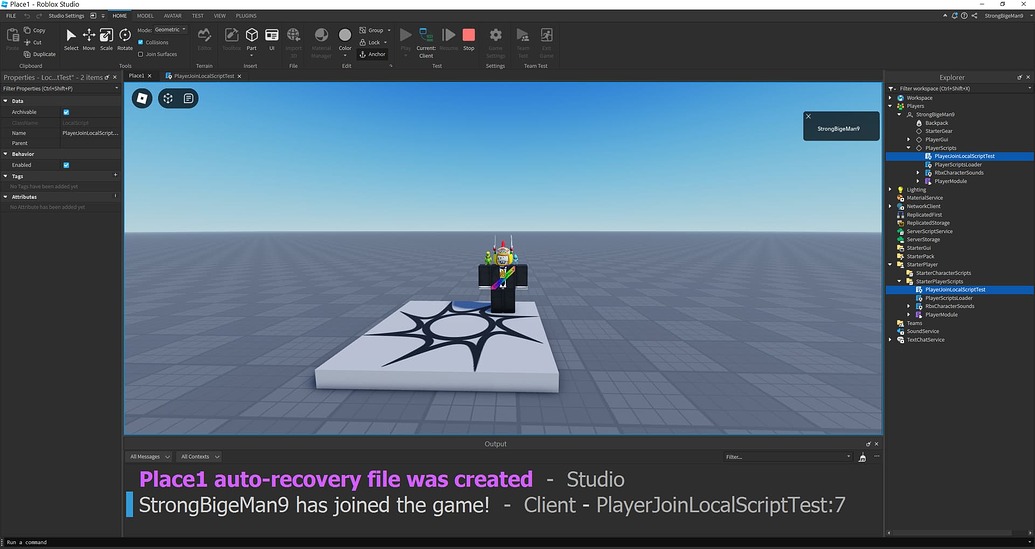
PlayerAdded And Not Working Scripting Support 2 690x307 . Game Players PlayerAdded Not Working Page 2 Scripting Support . Game Players PlayerAdded Not Working After Last Update Studio Bugs . PlayerAdded Function Won T Work Scripting Support Developer Forum 2 1035x549 . PlayerAdded Event Does Not Fire For Issue 445 445



PlayerAdded Not Firing Scripting Support Developer Forum Roblox . Why Does PlayerAdded Not Work On Scripting Support . How To Fix Roblox Age Not Working Roblox Age . 2026 Chat Replica Open Source Creations Feedback Developer Forum . Team PlayerAdded Not Working Scripting Support Developer Forum Roblox


PlayerAdded Not Working Scripting Support Developer Forum Roblox . Is Roblox Down Right Now Issues Roblox Not. PlayerAdded Function Won T Work Scripting Support Developer Forum 2 690x366 . Roblox Game Client Not Responding 2026 Crash Fix Tutorial YouTube . PlayerAdded Not Firing When Player Teleported Scripting Support



Why Is Roblox Not Working June 2026 24 Fixes That Actually Work Why Is Roblox Not Working 2025 24 Fixes That Actually Work . Team PlayerAdded Not Working Scripting Support Developer Forum Roblox . Why Is Microsoft Roblox Not Working Solutions For 2026 Roblox Mic Not Working . Why Is Microsoft Roblox Not Working Solutions For 2026 Roblox . PlayerAdded Not Working Scripting Support Developer Forum Roblox
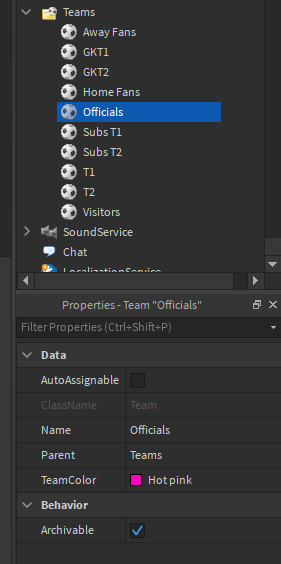


Team PlayerAdded Not Working Scripting Support Developer Forum . Game Players PlayerAdded Not Working After Last Update Studio Bugs . Is Roblox Down Right Now Issues Roblox Error Code 112 . Is Roblox Down Right Now Issues Why Is Roblox Not Working . How To Message On Roblox 2026 A Quick Guide



How To Message On Roblox 2026 A Quick Guide SL1500 . Roblox Keeps Crashing IOS Roblox Not Working Roblox App Problem . Game Players PlayerAdded Not Working After Last Update Studio Bugs . Humanoid Died Function In Scripting Support . PlayerAdded Not Working Scripting Support Developer Forum Roblox




Roblox In 2026 Play On Roblox NoFilter. What Is Haptic Roblox A Player S Guide 2026 Parental Guide For Roblox Usage UnicMinds . Roblox Gift Cards Removed From Microsoft Rewards 2026 Roblox Moderation System Changes Impact 2026 1024x572 . EASY How To FIX SHIFT LOCK Bug In Roblox Not Working PC 2026 YouTube . How To Publish A Game On Roblox In 2026 Roblox YouTube