















How can I hold my Switch without hand cramps in bed?
Using an ergonomic grip attachment for your Nintendo Switch drastically reduces hand fatigue during bed play. These grips are designed to provide a more natural and comfortable hold, distributing the console's weight better. They effectively transform the flat Switch profile into a controller-like experience, allowing for longer, pain-free gaming sessions.
What is the best way to keep my neck from hurting while playing Switch in bed?
To prevent neck pain, always try to elevate your Nintendo Switch to eye level using a flexible stand, a lap desk with a stand, or even a stack of firm pillows. This minimizes craning your neck downwards for extended periods, maintaining a neutral spinal alignment and significantly reducing strain. Regular neck stretches also help.
Are there any stands that attach to my bed for my Nintendo Switch?
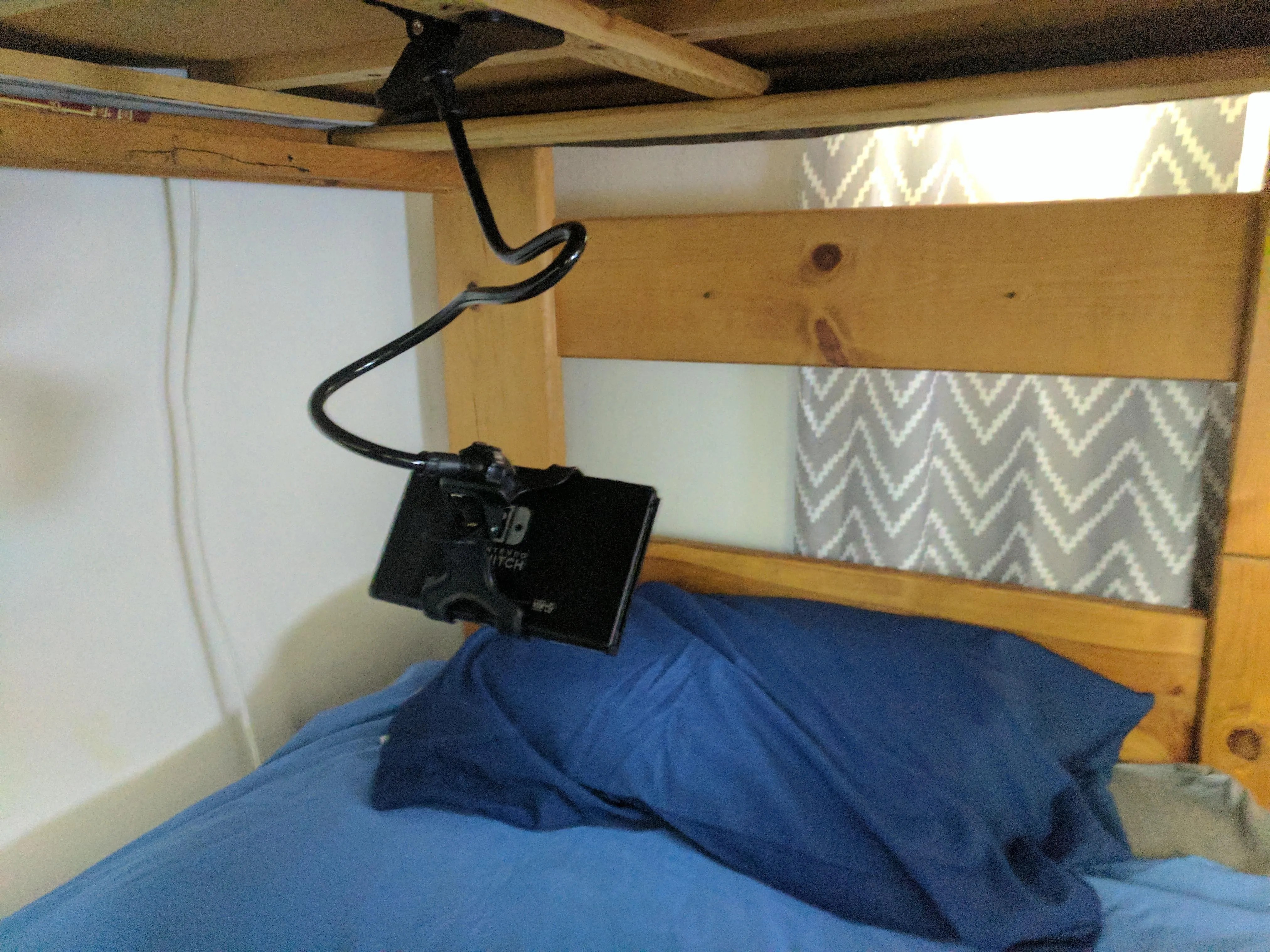
Yes, flexible gooseneck mounts are excellent for attaching your Nintendo Switch to your bed's headboard or bedside table. These stands allow you to position the console precisely at your desired height and angle, freeing up your hands and letting you recline comfortably without holding the device directly.
Should I use a special pillow for gaming my Switch in bed?
While not strictly necessary, a specialized gaming pillow or a firm wedge pillow can greatly enhance comfort. These pillows offer ergonomic support for your back, neck, or even serve as a stable base for propping up your Switch. They help maintain better posture than typical soft bed pillows, reducing slouching.
How often should I take breaks when playing Switch in bed?
It's highly recommended to take a short break every 20-30 minutes when playing your Nintendo Switch in bed. During these breaks, look away from the screen, stretch your body, and rest your eyes. This prevents eye strain, reduces muscle fatigue, and helps maintain focus for longer, more enjoyable gaming sessions.
Is playing Switch in bed bad for my eyes?
Playing Switch in bed isn't inherently bad for your eyes if you follow good practices. Ensure adequate room lighting to avoid harsh screen contrast, position the console at a comfortable distance, and take regular breaks. Using blue light filtering glasses can also help reduce digital eye strain, making the experience gentler on your vision.
Can I use my Switch in bed while it's charging?
Yes, you can safely play your Nintendo Switch in bed while it's charging. Ensure the charging cable isn't crimped or stressed. It's also wise to ensure adequate airflow around the console to prevent it from overheating, especially if you're playing demanding games for extended periods under blankets.
Ever wonder how to truly relax and enjoy your Nintendo Switch from the cozy confines of your bed without developing aches or strains? This comprehensive guide dives deep into practical solutions for optimizing your handheld gaming experience. We cover essential ergonomic accessories, ideal postures, strategic lighting setups, and crucial break tips to help you prevent common discomforts like neck strain and eye fatigue. Discover the best flexible stands, comfortable grips, supportive pillows, and smart setup tricks designed specifically for U.S. players seeking extended, pain-free gaming sessions while lounging. Make your bed the ultimate gaming haven with our expert advice, enhancing your enjoyment and potentially leading to better accessory choices for your specific needs.
How Do You Play Comfortably Switch in Bed?
Playing your Nintendo Switch in bed sounds like the ultimate relaxation, right? Yet, many gamers find themselves wrestling with awkward postures, aching necks, and tired hands after just a short session. The dream of comfy, extended gameplay often bumps up against ergonomic realities.
But what if you could transform your bed into a genuinely comfortable gaming sanctuary? It is entirely possible to enjoy your favorite Switch titles from under the covers without the usual discomforts. It just takes a bit of planning and the right gear.
| Problem | Quick Solution | Benefit |
|---|---|---|
| Neck Strain | Elevate console or use stand | Reduces looking down angle |
| Hand Fatigue | Ergonomic grip attachments | Distributes weight, better hold |
| Poor Posture | Supportive pillows, lap desk | Maintains natural spinal curve |
| Eye Strain | Adjust lighting, take breaks | Minimizes glare and fatigue |
| Console Heat | Ensure airflow around device | Prevents overheating issues |
First off, think about your posture, even when lounging. Just slumping into pillows might feel good for a minute, but it sets you up for trouble later. Aim to keep your head relatively aligned with your spine, avoiding that sharp downward bend.
Next, consider external support for your console. Propping your Switch directly on your chest or belly forces you into a specific, often uncomfortable, position. A flexible stand or even a stack of firm pillows can elevate the screen to eye level, making a huge difference.
Don't forget about your immediate environment; good lighting is paramount. Playing in a dimly lit room with a bright screen is a recipe for eye strain. Ensure the room has ambient light, and adjust your Switch's screen brightness accordingly to match.
Finally, remember to take short, frequent breaks. Even the most perfect setup won't magically eliminate the need to stretch your fingers, roll your neck, and rest your eyes. Step away from the screen for a few minutes every hour to reset.
| Accessory Type | Best Use Case | Key Benefit |
|---|---|---|
| Ergonomic Grips | Handheld Mode | Reduces hand strain, improves control |
| Flexible Gooseneck Stands | Hands-Free Viewing | Adjustable eye-level gaming |
| Lap Desks with Stands | Sitting Up/Semi-Reclined | Stable surface, keeps device cool |
| Supportive Pillows | Back & Neck Support | Maintains proper spinal alignment |
When it comes to ergonomic grips, these attachments can completely transform handheld play. They redistribute the console's weight, providing a more substantial and comfortable hold that mimics a traditional controller. Many feature textured surfaces for better grip and come in various shapes to fit different hand sizes.
Flexible gooseneck mounts or tablet stands are game-changers for hands-free gaming. You can clamp them to your headboard or place them on a nearby surface, then adjust the Switch to your perfect viewing angle. This setup lets you lie back fully supported, letting the stand do all the heavy lifting.
Beyond stands, don't underestimate the power of a good gaming pillow or lap desk. These items offer stable surfaces and additional cushioning, making it easier to maintain a natural and comfortable position for extended periods. Some lap desks even come with integrated fans to help keep your Switch cool during marathon sessions.
| Grip Style | Pros | Cons |
|---|---|---|
| Hard Shell Grip | Durable, precise fit, often affordable | Can add bulk, less cushioning |
| Soft Silicone Grip | Comfortable, shock absorption, good grip | Dust magnet, can feel less rigid |
| Integrated Power Bank Grip | Extends play, ergonomic design | Heavier, more expensive |
Frequently Asked Questions About Comfortable Switch Gaming in Bed
What's the best posture for playing Switch in bed?
The best posture involves supporting your back and neck, ideally by sitting up with pillows, or lying on your side with the console elevated. Avoid craning your neck downwards for extended periods to prevent strain. A good setup minimizes spinal flexion and ensures your screen is as close to eye level as possible, which reduces overall physical stress.
Many people find that stacking two or three firm pillows behind their back allows for a comfortable, semi-reclined position. Pair this with another pillow or a stand to lift the Switch, and you're golden. Lying flat on your back is also an option if you use a ceiling-mounted or highly articulated stand to hold the console directly above you, though this is a less common setup.
Ultimately, the key is avoiding static, uncomfortable positions for too long. If you start to feel any stiffness, it's a clear signal to shift around or take a break. Listen to your body and adjust as needed, even if that means completely changing your angle or position to alleviate pressure points.
Which accessories make playing Switch in bed more comfortable?
Ergonomic grips, flexible gooseneck mounts, tablet stands, and specialized gaming pillows significantly enhance comfort. These accessories reduce hand fatigue and allow for hands-free viewing, crucial for long sessions. They address common pain points that arise from holding the relatively small and flat Switch console for extended periods.
Ergonomic grips are often molded to fit the contours of your hands, providing a more natural and less strenuous way to hold the Switch, especially for games requiring precise inputs. Flexible stands free up your hands entirely, letting you prop the console at an optimal viewing angle while your body rests. Gaming pillows, often wedge-shaped, provide solid support for your back or even directly for the console.
When choosing, look for quality materials that are durable and easy to clean. Many reputable brands offer a variety of options, so you can find something that perfectly suits your specific needs and preferred gaming style. Investing in one or two good accessories can dramatically improve your in-bed gaming enjoyment.
How can I prevent neck and eye strain while gaming in bed?
Prevent strain by positioning your Switch at eye level, ensuring adequate room lighting, and taking regular breaks every 20-30 minutes. Using blue light filtering glasses can also reduce eye fatigue from screen glare. These simple steps combine environmental adjustments with personal habits to safeguard your health.
Placing your Switch at eye level, whether with a stand or strategically placed pillows, means your neck stays in a more neutral position, avoiding the constant downward tilt that leads to stiffness and pain. Good lighting reduces the contrast between the screen and its surroundings, making your eyes work less hard to adjust. Avoid playing in complete darkness.
Regular breaks are non-negotiable. Set a timer if you need to; every half hour, look away from the screen, stretch your neck and shoulders, and blink repeatedly to re-moisturize your eyes. These micro-breaks are incredibly effective at staving off accumulated fatigue and discomfort, allowing you to game longer and more comfortably.
Are there specific Switch stands recommended for bed use?
Look for adjustable tablet stands or flexible gooseneck mounts that clamp to your headboard or sit on a bedside table. Lap desks with integrated stands also offer a stable, comfortable surface for gameplay. The best choice often depends on your exact sleeping or lounging position and bed setup.
Gooseneck mounts are incredibly versatile, letting you bend and position your Switch exactly where you need it, often suspending it above you. Tablet stands, on the other hand, are great for propping the Switch up on a lap desk or tray, giving you a solid, unwavering viewing angle. Some stands even include ventilation to prevent your console from getting too warm during extended use.
Consider models with a wide base or strong clamping mechanism to ensure stability. No one wants their Switch tumbling down in the middle of a boss fight. Reading reviews specific to bed use can also help you find a stand that's durable and easy to adjust without needing to get out from under the covers.
What are good practices for long gaming sessions in bed?
Beyond ergonomic setups, incorporate short stretching exercises, stay hydrated, and vary your playing position. Setting a timer for breaks encourages healthy habits and prevents prolonged static postures. These practices are crucial for maintaining well-being during extended leisure time.
Simple stretches for your neck, shoulders, wrists, and fingers can work wonders. Just a few minutes of gentle movement every hour can release tension and improve blood flow. Keep a water bottle nearby to stay hydrated, as even mild dehydration can contribute to fatigue and headaches, dampening your gaming enjoyment.
Don't feel locked into one position. If you start in a semi-reclined setup, try shifting to your side for a bit, or even lying flat if your stand allows. Varying your posture keeps different muscle groups engaged and prevents any single area from bearing the brunt of sustained positioning. Ultimately, it's about being mindful and proactive about your comfort.